

gateway worlds skill world-data-ingestion prints the
agent-form checklist.
The rows file
Pick one of three shapes per file. An object of entity to rows. Several entities in one file.--entity. A JSON array or JSON Lines of plain objects, for one entity.
schema/world.json. Fields keep the
vendor’s casing.
Append or replace
--mode append(the default) adds rows. A row whose primary key already exists updates that row rather than duplicating it.--mode replaceremoves every row of each entity the file names, then inserts the file’s rows. Entities the file does not name are untouched.
/users/3/email.
1. See what the world holds
data/initial.json.
Ask for the rows you mean
data show --entity dumps an entity. data query filters it, pages it, and finds a redacted
row from the plaintext you know:
--where k=v is equality on the stored value, repeatable; the same key twice means “either”.
--limit and --offset page. Rows go to stdout as one JSON object per line, so the output
pipes into jq; the n of total footer and the resolved lines go to stderr. Without --where,
data query is data show --entity with a page size.
A world built from a vendor hashes its identifying fields on disk, so
--where email=jo@acme.test alone matches nothing. With --resolve, each value you pass is
turned into the form the store holds, per the world’s [redact] policy, and the query runs on
that. A field the policy drops resolves to nothing, and the output says so, because that field
was never written. worlds describe shows which fields resolve, and to what.
The same query is GET /api/public/worlds/{slug}/data?entity=&where=&resolve=true, queryRows
in the TypeScript SDK, and the query_world_data tool for an agent. A world
whose rows live in a data snapshot answers it too, without a session.
Ask in SQL
data sql runs one read-only SQL statement over a schema world’s rows, whatever database the
world uses. Use it for joins, counts and GROUP BY that data query cannot express:
ATTACH, PRAGMA or a second statement is
refused, and so is a statement that runs past 10 s, makes a value over 4 MiB or answers more
than 16 MiB. A blob comes back as {"base64": "..."}, and a float too large for JSON as the
text "inf" or "-inf". At most 1000 rows come back (--limit); the output says when there were more. The
same read is POST /api/public/worlds/{slug}/data/sql with {"sql": "..."} and the
sql_world_data tool for an agent. A world built on db/schema.sql is a plain SQLite file:
read it with sqlite3.
2. Import
data/initial.json is updated in place.
Give a platform world’s slug and the rows stream up as gzipped chunks into a data batch.
The platform validates every row against the contract, applies the batch onto the world’s
snapshot, and turns it into a data-only version. --publish now (the default) cuts that
version per batch; --publish later leaves the batch pending until you fold several together
with data publish.
Imported rows stay with the world as you keep building it. Add a tool, change a handler, a
route, a test or the docs, and the next version serves the same rows with no new import, from a
sandbox or a local checkout alike, and a fork of the world (gateway bench fork) starts with the
same rows. A change to the data’s shape (an entity, a field or its description, a key or a
relationship) needs the rows imported again against the new shape, and schema compile names
what changed.
Exit 0 means applied or published, exit 2 means refused with a report written, exit 1 is an
error.
Check before you write
data check is data import --dry-run under its own name: every row is validated against
the world’s contract and nothing is uploaded or written. A slug runs a dry-run batch on the
platform; a directory runs the import over a scratch copy. Exit 2 when any row is refused,
and --report writes every refusal as JSON Lines rather than only the first few.
Redact on the way in
Imported rows are stored exactly as given. Pass--redact when they are not already redacted:
apply runs the world’s [redact] policy over every row first; refuse rejects a row that
carries plaintext in a redacted field. Both need a connector.toml. See
Keep real data out.
Over MCP the same import is
import_world_data with slug or containerId, rows in
the object shape, and optional mode, redact and message. It answers versionId and
entityCounts.Large files: the batch lane
Large files go up as chunks, anddata import against a slug does the chunking for you.
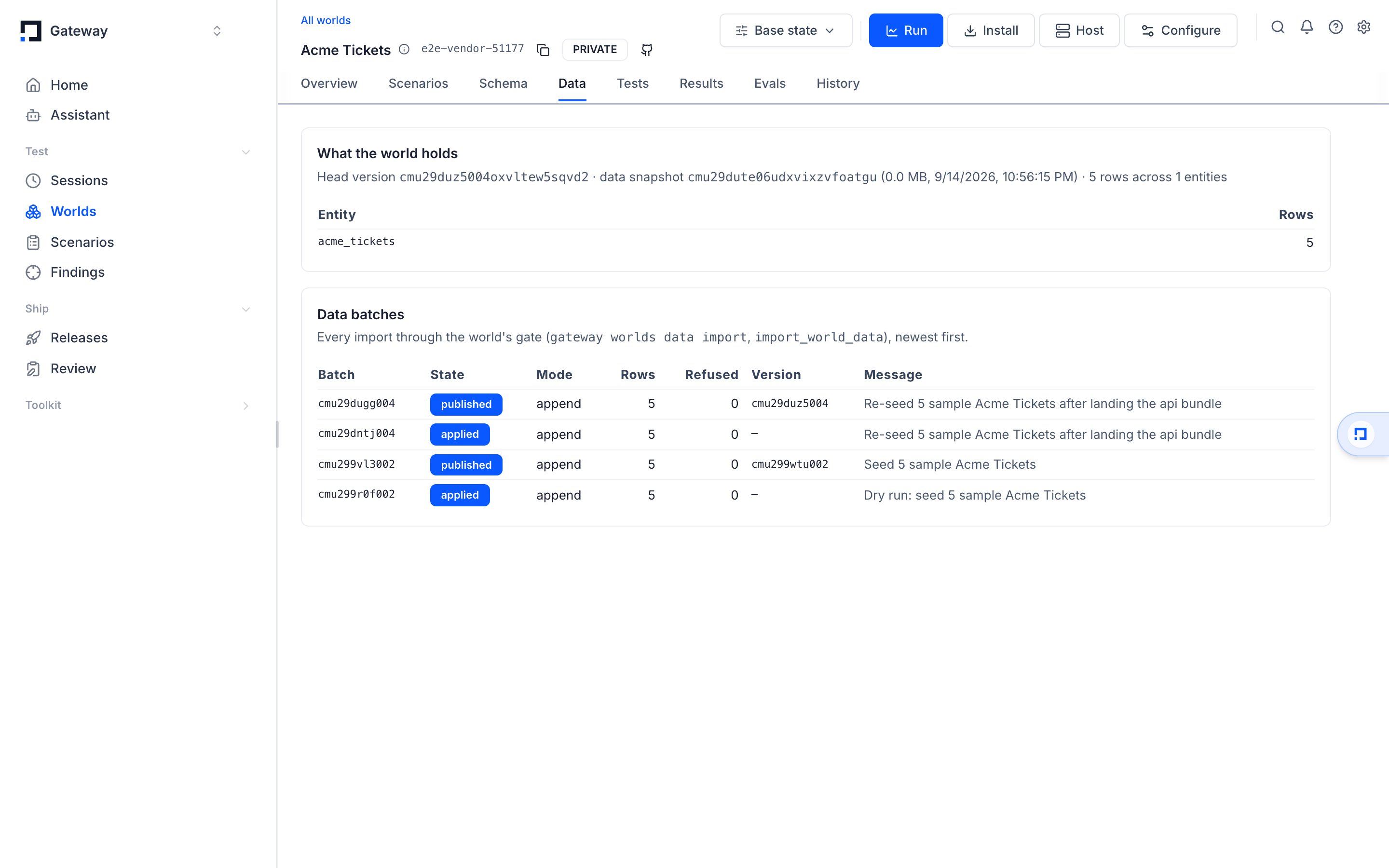
Watch a batch
open, uploading, queued, validating, applying, and then rests
at applied, refused, published or failed. The last three of those are final, so
re-running an import against one is a no-op. data publish folds every applied
--publish later batch into a single data-only version.
The CLI records each upload under .gateway/imports/, which is what --resume reads and
what lets data status find a batch without being told its world.
3. Seed a live session
A session is one running copy of a version. Seeding changes that copy only, so it is where you try rows before they become a version.seed_world_session, which takes redact alongside rows and mode; over
HTTP: POST /api/public/world-sessions/{sessionId}/calls with
{"kind": "seed", "rows": {...}, "mode": "append"}, and {"args": {"redact": "apply"}} when
the rows need redacting on the way in.
A task can carry the same redact mode in its seed block, so every session the task opens
seeds the same way. See Keep real data out.
4. Turn a real run into rows
{args, completedAt, error, kind, result, seq, tool}, where kind is call, grade, seed, reset or close. Reads carry
rows in their result; writes carry the row the world should hold in their args and
result. The REST and MCP forms of the same record add two more fields, state and
createdAt.
Pull, transform, ingest
A tool’s response is not the entity’s shape, and nothing is inferred. The route is three commands, each re-runnable:1. Pull the raw calls
calls pull writes tool-call records, one JSON object per line, and prints what they hold:
records per tool, and every distinct result shape (an object’s top-level keys, an array’s
item keys) with its count. Nothing is shaped.
{tool, args, result, at, source}, with source set to
trace:<traceId>/<observationId> for a trace and session:<id>/<seq> for a world session;
an ERROR-level observation carries error instead of result, and ingest skips it,
counted. --from traces reads GET /api/public/observations?type=TOOL (per --trace,
paged; --since and --until bound the window) or GET /api/public/sessions/{id}?includeIO=true.
A saved ClickHouse result is {rows: [{id, trace_id, name, input, output, start_time, level}]}
(text before the JSON is skipped); input and output are decoded as JSON, or kept whole
under _raw. gateway worlds session export lines and records written by captureToolCalls
in the TypeScript SDK (capture_tool_calls in Python) are the same record.
2. Write the transform
A transform is your code. It exportstransform(records) and returns {entity: [rows]} — a
.py file, or .ts / .mjs for node — or it reads the records as JSON Lines on stdin and
prints that document. It decides everything: which tool’s result is which entity, what a
nested list becomes, what a write’s args become, which call wins. The script runs in a
subprocess with a time limit (--timeout, default 120 s), sockets disabled and no GATEWAY_*
variables; its stderr is shown.
The CRM case, from the pull above: crm_read, crm_search and the two updates return CRM
objects (an account carries tier and nests contacts and deals; a deal carries stage
and nests its account; a contact carries email). crm_log_activity and
crm_delete_contact return nothing worth a row, so their rows come from the call’s args,
keyed by the observation id. The latest call wins for an id.
3. Ingest
data import does: the contract, refusals naming
entity, index and field, primary-key upsert, the batch lane for a slug. The report is N records, N ingested, 0 skipped, R refused — via transform, rows per entity, the refusals as
[index] pointer: reason, and for a slug the batch and its version; --json prints it as one
document. Exit 0; 2 when a row was refused; 1 when the transform failed (its stderr is on
yours) or the platform did.
Redaction is optional and off by default: rows land as your transform returned them. Pass
--redact apply to run the world’s [redact] policy over them first, or --redact refuse
to reject plaintext in a redacted field. See Keep real data out.Ingest from any source: a declared mapping
ingest.toml declares where every field comes from, with no code. A field with no line is
never set; a record no [[sources]] claims is reported by name; nothing is inferred.
The file is checked when it loads: every entity and field must exist in the contract, every
transform must be in the set, every
carry must name a field the parent maps. [*] walks a
list in select and explode.path; select = "result[*]" reads an array result item by
item. at = "updated_at" on a source dates its rows from the item for on_conflict;
otherwise the record’s at does.
map init writes the file to start from: one [[sources]] per source shape in a sample
(per tool for tool calls), every source field with a sample value on one side, every entity
field on the other. Only an exact-name match is filled in, and each one is marked # exact-name match — confirm; every other field is a commented # entity.field = "" line.
Tool calls that already are the operation’s response
With neither a transform nor a mapping, and noingest.toml in the world, a tool-call record
goes through its tool’s [[operations]] entry in connector.toml: the result is read at the
operation’s results path and projected by its [ingest] table (drop, explode,
carry_args from the call’s args) exactly as a capture is.
Use it when a tool’s result is the vendor’s response body and nothing else. The report says
via operations and notes that this is the operation’s projection, not a mapping; a tool that
is not one of the world’s operations is refused by name.
Rows already shaped
--from rows with nothing declared is data import: a rows file, or bare rows with
--entity, through the same gate. A file the world already fits needs no route at all.
Let data extract do the shaping
data extract reads a tool-results export, a raw vendor response or a session export and
writes rows already shaped for data import:
--merge fill keeps the first row, --merge upsert the last — and
runs the world’s [redact] policy over every row unless you pass --no-redact. The summary
on stderr is {"read": N, "rows": M, "unknownFields": {...}, "redacted": {"dropped": n, "hashed": n}}.
A real run holds real records.
data extract redacts by default; data import and
data ingest do not, so pass --redact apply when rows from a run go straight in. See
Keep real data out.Captures are the other way in
For a vendor you can call,gateway worlds connector capture records what the real service
returns and gateway worlds connector ingest seeds the world from it through the same
contract. See Mock any vendor API.
Where to go next
- Keep real data out for the
[redact]policy and the--redactmodes. - Getting started for the whole path from an empty directory to a graded run.
- Mock any vendor API for captures, handlers and conformance.
- MCP Server for
import_world_data,seed_world_sessionandexport_world_session.