> ## Documentation Index
> Fetch the complete documentation index at: https://docs.surfacearea.ai/llms.txt
> Use this file to discover all available pages before exploring further.
# Spin worlds up and down
> A session is one running copy of a pinned world version. Open it, point your agent at its URL, grade it, and close it — or pin it so the URL stays up.
A session is one running copy of a pinned world version. Nothing in one session reaches any
other.
Opening a session copies the version's data, lays the [scenario](/glossary#scenario)'s seed on
top, and returns an address your agent can call. Grade it, close it, open another. The version
underneath never moves, so every session starts from the same known state.
 ## Open one and read what it prints
```bash theme={null}
export GATEWAY_HOST=https://withgateway.ai
export GATEWAY_PUBLIC_KEY=pk-lf-...
export GATEWAY_SECRET_KEY=sk-lf-...
gateway worlds session open vendor-world --task default --surface api
```
The output is the session descriptor:
```json theme={null}
{
"sessionId": "clx7f2...",
"surfaces": ["tools", "api"],
"api": {
"url": "https://w-clx7f2...-api.worlds.withgateway.ai",
"token": "…"
},
"task": { "source": "bundled", "name": "default" },
"ready": true,
"idleExpiresAt": "2026-01-01T12:30:00.000Z",
"pinned": false
}
```
Before the descriptor, `open` prints `session opening — gateway worlds session status ` on stderr, so a wait cut short keeps the id. The platform answers as soon as it accepts the session and the World Host opens it right after; `open` waits for `ready` up to `--timeout` seconds (600 by default). `idleExpiresAt` is when the idle reaper closes the session, and is `null` while it is pinned.
`sessionId` addresses the session in every other command. `api.url` is the world's own HTTP
API for that session alone — the host name carries the session id, so two sessions of the
same world never share an address.
## Surfaces: ask for what your agent actually uses
Every session serves `tools` over the platform's rendezvous. Ask for more with `--surface`
(short form `-s`), repeatable or comma-separated.
| Surface | What answers | Asked for with |
| - | - | - |
| `tools` | The world's tool calls; always served | nothing, it is on |
| `api` | The vendor's routes from `connector.toml`, at `api.url` — served with the tools from one World Host session | `--surface api` |
| `ui` | The world's page over its routes, where `connector.toml` declares `[ui]` — generated from the contract or hand-written ([Give a world a UI](/worlds/ui)) | `--surface ui` |
| `browser` | A hosted browser driving that page, leased from the browser pool | `--surface ui,browser` |
Ask only for surfaces the world declares. `browser` needs `ui`.
A World Host session's browser runs on one of two tiers. Pick one with `--browser-tier`; left
out, your organization's default applies (and `standard` when the organization has none).
| Tier | Capacity |
| - | - |
| `standard` | Spot capacity first, about half the price. It may be reclaimed with two minutes' notice, which ends the browser, never the world |
| `premium` | On-demand only; never spot-reclaimed |
```bash theme={null}
gateway worlds session open acme-world --task default --surface ui,browser --browser-tier premium
```
When a `standard` browser is reclaimed, the platform puts a new one behind the same `wsUrl` and
token. A browser from the SDK's `browser()` reconnects on its own within 90 seconds and reopens the
page the agent was on. A read (text, screenshot, title) or a `goto` that lost its browser is then
retried once. A click, type, press, back or scroll is not replayed, since it may already have
reached the world: the SDK raises `BrowserReconnected` so the agent looks at the page before acting
again. What lived only in the lost browser is gone: the open page's unsaved client-side state and
anything typed but not submitted.
If you drive your own Playwright, call `session.repairBrowser()` (TypeScript) or
`session.repair_browser()` (Python) after a dropped connection, then reconnect to the same `wsUrl`.
Opened with `--surface ui,browser`, the descriptor adds where the page and the browser answer:
```json theme={null}
{
"surfaces": ["tools", "api", "ui", "browser"],
"ui": { "url": "https://w-clx7f2....worlds.withgateway.ai/", "entry": "https://w-clx7f2....worlds.withgateway.ai/?token=…" },
"browser": { "wsUrl": "wss://w-clx7f2...-cdp.worlds.withgateway.ai/cdp/…", "viewport": { "width": 1280, "height": 800 }, "tier": "standard" }
}
```
`ui.entry` carries the session token once; the host trades it for a cookie on the first load.
`gateway worlds session browse ` opens that page in the browser surface and prints
what the agent would read.
## Send the token the way your client already sends credentials
A World Host session gates `api.url` on a per-session token, printed beside the URL. Send it
as a header on every request, never in the URL — a query token would outlive the request in
access logs.
```bash theme={null}
curl -sS -H "Authorization: Bearer $TOKEN" "$API_URL/v1/accounts"
```
Worlds whose vendor uses a `header` or `basic` scheme also accept the same token the vendor's
own way, so a client written against the real service works unchanged:
| The vendor's scheme | Also accepted |
| - | - |
| `header` | The vendor's header, e.g. `x-api-key: ` |
| `basic` | Basic auth with `` as the user |
| `oauth2` | The token as the password in a password grant |
Point an existing integration at a world by changing two values: the base URL
and the key. No code in your client has to know a world exists.
## Every session names the engine that serves it
`gateway worlds session status ` prints the engine serving it.
Every world opens on the World Host. The engine is not a choice you make on open: the host serves a world's tools and HTTP routes from one session.
| Engine | What it is |
| - | - |
| `host` | The World Host: a reflink clone of the version's snapshot in a shared process |
| `eks` | A pod, for a world whose `[ui]` is its own image or that ships its own server |
A benchmark package (harbor, verifiers) runs in a container, where the runner serves its tools. A schema world links other worlds into its session, and the host opens each linked world beside it.
## Drive the session
```bash theme={null}
gateway worlds session open vendor-world --task default --surface api
```
Use `--version-id ` to pin an exact version instead of the world's head. Every
[run](/glossary#run) then records the version it faced.
Call the world's tools, or its HTTP routes at `api.url`, or both. Both change the same state,
so a record written through the API is the record a tool call reads back. Tools and routes are
separate surfaces: a route answers over HTTP at `api.url`, and a call by a route's name answers
`400 {"error": "not_a_tool"}`, pointing at `api.url`. A tool may share a route's name; the call
runs the tool, and the route stays at its path. A task's `tools` lists the tools it may call, and
a task that lists any also closes the world's routes for that session (`403 route_not_allowed`).
A session answers its requests one at a time, and the sessions of one world version take turns.
Under a burst a request waits its turn, or answers `503 {"error": "busy"}` with a `Retry-After`
header: wait that many seconds and send it again. A tool call, a route, a grade, a seed, a reset, or
a read of the session's state or evidence that runs past 45 seconds answers
`504 {"error": "call_timeout"}` naming it; it may still finish, and until it does the session's next
requests answer `503 {"error": "call_running"}` with a `Retry-After`. If the process running the
world's own code restarts (it also does when a call has run for more than two minutes), the call in
flight answers `502 {"error": "worker_exited"}`; send it again, and the session, with any world it
opened beside it, carries on from every change already answered.
The session page links to its **Traced session** once anything is traced under the session's
id: the platform's trace of each episode's tool calls, and your agent's own traces when it
traces inside the session with the Gateway SDK (`with open_session(...) as s:` in Python,
`session.withTraceContext(fn)` in TypeScript). See
[Trace inside a world session](/tracing/sessions#trace-inside-a-world-session).
```bash theme={null}
gateway worlds session state # every entity's rows, right now, plus `calls`
gateway worlds session grade # {reward, rewards, raw} from the task's grader
```
The state carries one thing beside the rows: `calls`, every call the session answered — a
vendor-route request (operation, path args, query, body) or a tool called by name (its name and
arguments) — with `selectors` (every string the request carried, wherever it sat), `via` (the door
it came in by), status, the rows the answer carried and `found` (rows came back), because an
investigation that only reads leaves nothing else behind. `rows` counts what the route serves:
a list at its envelope or `results` path, or a `single` route's one row, bare or at that route's
own envelope. It is null where nothing declares the rows, a tool's object answer included. A field named as a credential (a password, token, secret, API key, PIN, card
number, CVC, e-signature), an item of a list so named (`passwords`), a `value` inside a field
so named (`password.value`), or a value shaped like one (a provider key, a bearer, a JWT, a
private key) is kept as `[redacted]`; every other field is kept as the agent sent it. A request
too large to keep (over 100,000 values or 1 MiB of text) names what it lacks in `withheld`: a
route call keeps its path and query and withholds its body, a tool call its arguments. A long
session's log keeps its newest calls, and its first `seq` says how many are gone. A session brought
back from its checkpoint numbers on from that checkpoint's calls, so the calls made after it are
not counted ([Bring a closed session back](#bring-a-closed-session-back)). A check grades
whenever the calls it can read decide it; where a withheld field, a null `found` or a call no
longer kept could change the result, it is ungraded, never guessed.
A grader reads it like an entity: `{ "entity": "calls", "where": { "operation":
"get_records_by_email", "found": true }, "assert": "any", "field": "selectors", "op":
"contains", "value": "alex@example.com" }` requires "the agent searched this and got rows",
whatever the vendor's request shape. `gateway worlds session export --requests` prints it whole,
a `gateway worlds serve` session's `GET /__session/state` carries it as the platform's does, and
`snapshot` and `calls` are reserved names an entity may not take.
`via` tells a click in the world's UI from a request the agent sent straight to the API. The
host sets it from where the request arrived, never from a header, so an agent cannot claim
another door:
| `via` | The request came in by |
| - | - |
| `ui` | the UI's same-origin `api_path` prefix (`/__world-api/…` on the session's UI origin) |
| `api` | the session's API origin (`api.url`) |
| `tool` | a tool called by name (`session.call(…)`) |
So "the agent opened the tab from the app, not the API" is one check:
`{ "entity": "calls", "where": { "operation": "open_workspace_tab", "via": "ui" }, "assert":
"exists" }`. `via` names the door, not who knocked: anything that holds the session's UI
cookie or token and calls the UI origin's prefix is `ui`. `gateway worlds serve` tags the same
way: only the UI port's prefix counts as `ui`; the same prefix on the session port is the API
origin, so it is `api`.
`via` checks read the call log of a world with HTTP routes (a `connector.toml`), on a World
Host session or under `gateway worlds serve`. When you create, update or validate a stored task,
each world its `via` checks read (in `where` or as `field`, on `calls` or a cross-world
verifier's `.calls`) must run on the World Host and have routes. Create and update
answer 400 naming the world; validate answers `ok: false` with it under `problems`. A check
that names `via` over a call log without it is ungraded (the grade says why), never a pass.
A grade may carry the agent's own report (`session.grade({ report })` in TypeScript,
`session.grade(report=...)` in Python, `report` in the body of `POST …/calls` with
`kind: "grade"`). A rubric judge reads it as the agent's claim beside the evidence — a
finding is credited only where the state or the calls bear it out, and a claim the evidence
contradicts counts against it. Assertions and python graders ignore it.
```bash theme={null}
gateway worlds session reset # back to the opening state; the call log stays
gateway worlds session close
gateway worlds session close --keep-warm # hand the container back to the pool
```
## The rest of the session commands
| Command | What it does |
| - | - |
| `gateway worlds session list` | The project's sessions in every state, from provisioning to stopped, newest first; the live ones are `--state RUNNING` and `--state IDLE` |
| `gateway worlds session status ` | State, engine, tools, surfaces, `idleExpiresAt` and `pinned` |
| `gateway worlds session state ` | Every entity's rows as the live world holds them |
| `gateway worlds session seed rows.json` | Put rows into the live copy only; see [Put data in a world](/worlds/data) |
| `gateway worlds session reset ` | Back to the version's snapshot plus the task's seed |
| `gateway worlds session grade ` | Run the task's grader over the end state |
| `gateway worlds session export ` | The call ledger as JSONL, oldest first; `--requests` appends the world's own request log |
| `gateway worlds session browse ` | Open the UI in the browser surface and print what the agent would read |
| `gateway worlds session pin ` | Exempt the session from the idle reaper |
| `gateway worlds session close ` | End it |
| `gateway worlds session reopen ` | Bring a closed session back, same id, from its last checkpoint |
`session export` writes the calls the platform brokered: `call`, `grade`, `seed`, `reset`, `state`
and `close`. A U+0000 character in a call's arguments or result is recorded, and handed to the
world, as U+FFFD (the replacement character). `--requests` also reads the world's own request log from the live session and appends
each entry as a line with `kind: "request"`. That log is the `calls` a grader reads, so it holds
the requests your agent made through the browser or straight to `api.url`, each with its `via`.
```bash theme={null}
gateway worlds session export --requests --out acme.calls.jsonl
# wrote 12 calls and 40 requests to acme.calls.jsonl
```
A request line carries `{seq, kind: "request", tool, args: {method, path, args, query, body, via},
result: {status, rows, found}, error: null, completedAt}`, where `tool` is the operation, or the
tool called by name (its `method` and `path` are null). Credential fields read `[redacted]` in
request lines; `call` lines keep a tool's arguments as your agent sent them.
`--requests` reads the running session with one `state` call, which the
ledger records like any other, so export before you close. A session that
cannot answer fails the command, and nothing is written.
## Tasks that need several worlds
Some tasks span worlds: an investigation reads a breach feed, a threat-intel API and a
ticketing system, and the agent needs all three up at once. A stored task declares every
world it needs in a `worlds` table, and one command brings them all up.
```json theme={null}
{
"name": "orion-infostealer",
"instruction": "Find the stolen credentials and lock the account.",
"metadata": { "case": "c_42" },
"worlds": {
"spycloud": {
"slug": "spycloud-world",
"seed": { "rows": { "breaches": [{ "id": "b1", "email": "a@x.io" }] } },
"grader": { "kind": "assertions", "checks": [{ "entity": "breaches", "where": { "id": "b1" } }] },
"tools": ["search_breaches"]
},
"torchlight": { "slug": "torchlight-world", "ref": "v2" },
"flashpoint": { "slug": "flashpoint-world" }
}
}
```
Each key is an **alias** — what the sessions come back under. Each entry names a world
(`slug`), optionally one of its branches or tags (`ref`, default `main`), and that world's
share of the task: its own `seed`, `grader` and `tools`, the same three fields a single-world
task carries. With `worlds` present the top-level `seed`, `grader` and `tools` are refused
(they have no world to apply to), and the task is not pinned to any one world. The
`instruction` and `metadata` are shared by every world.
```bash theme={null}
gateway worlds task create ./tasks/orion.json # every slug and ref is checked now
gateway worlds task validate # each alias against its world's contract
gateway worlds task up --surface api --out orion.manifest.json
gateway worlds task status orion.manifest.json
gateway worlds task grade orion.manifest.json # per-world rewards + the aggregate
gateway worlds task export orion.manifest.json --out orion.calls.jsonl
gateway worlds task down orion.manifest.json
```
`task up` opens one session per alias in **one platform call** and prints one manifest:
```json theme={null}
{
"taskId": "wt_…",
"taskVersion": 1,
"name": "orion-infostealer",
"instruction": "Find the stolen credentials and lock the account.",
"sessions": {
"spycloud": { "slug": "spycloud-world", "ref": "main", "private": false, "sessionId": "…", "ready": true, "surfaces": ["tools", "api"], "api": { "url": "…", "token": "…" } },
"torchlight": { "slug": "torchlight-world", "ref": "v2", "private": false, "sessionId": "…", "ready": true, "surfaces": ["tools", "api"], "api": { "url": "…", "token": "…" } },
"flashpoint": { "slug": "flashpoint-world", "ref": "main", "private": false, "sessionId": "…", "ready": true, "surfaces": ["tools", "api"], "api": { "url": "…", "token": "…" } }
}
}
```
Each entry is what `session open` prints for that world. `up` is all or nothing: if any
world refuses to open, the ones that did are closed and the error names every alias that
failed — nothing is ever half up. `up` also takes a spec file directly (`task up ./orion.json`)
for a task you have not stored.
Each `ref` resolves through your edit view: when you have an open edit session on a world
and it has written a version (see `gateway worlds edit status`), that world's `main` comes up
at your session's tip; everyone else still gets the shared `main` until you close the edit.
`task create` and `task validate` check the same versions, so what they accept is what `up`
opens.
`"private": true` means exactly one thing: your open edit session's tip stood in for `main`.
It is `false` for a tag or any other branch, and for an edit session that has not written
anything yet. Every manifest entry and every `validate` row carries it; `validate` on a task
pinned to one world carries it at the top level (`false` for `--version-id`), and a
multi-world answer's top level and an alias that did not resolve say `null`.
The later commands take either the manifest or the task id. With a task id, `status` and
`grade` find the stored task's live sessions (and refuse when an alias is up twice from two
`up`s — pass the manifest then); `down` closes every live session of the task.
`task grade` answers `{reward, rewards, worlds, ungraded, verifiers, errors}`: `worlds` holds
each alias's own grade, `rewards` flattens them as `` and `.`, `reward` is
the mean of the worlds that answered a number, and a world with no grader (or a rubric judge
still pending) is listed under `ungraded` rather than counted as 0. A grader that could not
grade is named under `errors`; the `reward` is then `null` and the command exits 1. `task export` writes every
world's call ledger as one JSONL file with a `world` field on each line; `--requests` adds each
world's own request log the same way (`wrote N calls and M requests from K worlds to `).
Under the hood this is `POST /api/public/world-task-sessions` with `{task: {id} | spec,
surfaces?, reuseWarm?, browserTier?}` (`browserTier` applies to every world), answering the manifest, and `GET /api/public/world-task-sessions?taskId=`
listing a task's live sessions. Open a multi-world task through `task up` or this endpoint.
### Edit several worlds together
Every change you push to a world (`bench push`, a sandbox commit, a data import) lands on your
**edit session** for that world: a private copy only your key sees, which becomes the world's shared
`main` when you close it, or after 60 minutes without an edit. When one change spans the worlds of
a task, close them together, so `main` never holds half of it:
```json theme={null}
{
"name": "support-reply",
"instruction": "Answer the customer in the help desk and post the summary in chat.",
"worlds": {
"desk": { "slug": "acme-desk" },
"chat": { "slug": "acme-chat" }
}
}
```
```bash theme={null}
gateway worlds task edit status support.json # per world: your unsealed edits, and what closing would do
gateway worlds task edit close support.json -m "reply templates in desk and chat"
gateway worlds task edit rollback support.json --group
```
* `status` lists, per alias, your open session (edit count, base, tip) and what closing now would do:
`fast-forward`, `rebase` (`main` moved on other files) or `conflict` with the paths, plus any of your
sessions `parked` in conflict there. `unsealed` names the worlds holding edits only you see: your
own `task up` opens them at your tip (`"private": true`), while colleagues, run configs and schedules
still get the shared `main` until you close them.
* `close` seals every world in **one step**: every `main` moves, or none does. If any world conflicts,
is not in your project, names a `ref` other than `main`, or holds a session of yours parked in
conflict, nothing is sealed and the error names every world's problem (exit 1); a parked session is
resolved with `gateway worlds edit close --session --force` or `edit discard`. A world
with no open edit is skipped and listed under `skipped`; `--require-all` refuses instead. `--force`
keeps your files where `main` changed the same paths.
* The answer is `{groupId, worlds: {alias: {slug, session}}, skipped}`. `rollback --group `
returns every world's source and data to the `main` the group replaced (a colleague's change that
landed before yours stays), again in one step, as new sessions you can roll back too. It is refused
when anything reached a world's `main` after the group — a later session or a write outside
sessions — unless `--force`. A world whose seal left `main` where it was (someone had already
sealed the same files) has nothing to undo and is listed under `skipped`; the other worlds still
roll back together.
* `` is a task id, a spec file, or the manifest `task up --out` wrote. Only your own open sessions
are sealed; close before a session idles out (60 minutes), or that world seals on its own.
Under the hood this is `POST /api/public/world-task-edits/status|close|rollback` with `{task: {id} |
spec, …}`; the MCP tools are `get_task_edit`, `close_task_edit` and `rollback_task_edit`. For one
world, `gateway worlds edit status|close|rollback ` does the same.
### Verifiers that span worlds
A world's `grader` only sees that world. A scenario question that spans worlds — *was the
company officer found in the registry the owner of the wallet seen on chain? did the agent
consult every source before concluding?* — lives on the task instead, as a **verifier**: the
same `assertions` or `python` grader, with a `scope` of aliases it reads.
```json theme={null}
{
"name": "offshore-shell-trace",
"instruction": "Identify who controls Acme Holdings and where its funds went.",
"worlds": {
"registry": { "slug": "opencorporates-world" },
"chain": { "slug": "chain-world" },
"leaks": { "slug": "spycloud-world" }
},
"verifiers": [
{
"name": "consulted_every_source",
"kind": "assertions",
"scope": ["registry", "chain", "leaks"],
"checks": [
{ "entity": "registry.calls", "assert": "count", "count": { "gte": 1 } },
{ "entity": "chain.calls", "assert": "count", "count": { "gte": 1 } },
{ "entity": "leaks.calls", "assert": "count", "count": { "gte": 1 } }
]
},
{
"name": "officer_is_wallet_owner",
"kind": "python",
"scope": ["chain", "registry"],
"source": "import json, sys\ns = json.load(sys.stdin)\nofficers = {r['name'] for r in s['registry.officers'].values()}\nowners = {r['owner_name'] for r in s['chain.wallets'].values()}\nprint(json.dumps({'reward': float(bool(officers & owners))}))\n"
}
]
}
```
A verifier reads one state in which every scoped world's rows are `.` and
its call log `.calls` — the naming a world's dependencies already use, so a check or
a `verify.py` written for one world reads the merged state the same way. The agent's
`report` sits at the top, as for any grader. A `scope` names two or more of the task's
aliases; a `rubric` cannot be a verifier (a judge reads one world), and a verifier cannot be
anchored on a world whose own grader is a rubric.
A `python` grader or verifier prints one flat JSON object as its last line: `reward` plus one
number per check, such as `{"reward": 0.5, "card_moved": 1, "assigned": 0}`. Each other key
becomes a check under the world's alias (`asana.card_moved`). A check is a number from 0 to 1,
`true` or `false` (1 or 0), or `null` for a check it could not grade; a string reads as ungraded
too. A nested object or array, such as checks nested under `rewards`, a number outside 0 to 1, or
`NaN` / `Infinity` fails the grade with an error that names the key (and the value, for a
number). Print diagnostics such as counts to stderr.
Verifiers run on the platform, never on your machine: each one runs on the World Host
session of the **first alias in its scope**, and the platform reads the other scoped worlds'
evidence from their own sessions when the grade is called — `task grade` and the SDKs name
the task's other sessions on every grade for you. `task grade` then answers:
```json theme={null}
{
"reward": 0.83,
"rewards": {
"registry": 1.0, "chain": 1.0,
"x.consulted_every_source": 0.667, "x.consulted_every_source.check_2": 0.0,
"x.officer_is_wallet_owner": 1.0
},
"worlds": { "registry": { … }, "chain": { …, "verifiers": { … } }, "leaks": { … } },
"verifiers": {
"consulted_every_source": { "reward": 0.667, "rewards": { "check_0": 1.0, "check_1": 1.0, "check_2": 0.0 } },
"officer_is_wallet_owner": { "reward": 1.0, "rewards": {} }
},
"ungraded": ["leaks"],
"errors": {}
}
```
A verifier's rewards flatten under `x.`, so no world may be aliased `x` or `x.<…>`:
creating or validating such a task is refused. The task's `reward` is the mean over the worlds
**and** the verifiers that answered a number. A verifier that could not grade (a scoped
world's session gone, a check naming an entity no scoped world holds, a `verify.py` that
failed) is named under `errors` as `x.`, with the reason also under
`verifiers..error`; the task's `reward` is then `null`, never the mean of the rest, and
`task run` files the run failed with that reason. No world's contract vets a cross-world
check's entity, so a misspelt one is an error rather than a silently passing `absent`.
Grading a session by hand (`session grade --world alias=sessionId …`, or `POST …/calls`
with `kind: "grade"` and `worlds: {alias: sessionId}`) names the other sessions the same
way. What the caller got wrong is refused with its name: a scoped alias left out, or a
session that belongs to another task than the alias's world.
## Keep a session up past the idle timeout
A session closes after 30 idle minutes unless it is pinned. Traffic counts as activity,
including plain HTTP to `api.url`, so a session in use stays up on its own.
Pin a session when its URL has to answer around the clock — a demo, a long-lived integration
test, a world someone else is pointing a client at. Four ways do the same thing:
```bash theme={null}
gateway worlds session pin # pin
gateway worlds session pin --off # unpin
```
```bash theme={null}
curl -sS -X PATCH "$GATEWAY_HOST/api/public/world-sessions/$SESSION_ID" \
-u "$GATEWAY_PUBLIC_KEY:$GATEWAY_SECRET_KEY" \
-H 'Content-Type: application/json' \
-d '{"pinned": true}'
```
The other two are in the app: **Pin** on the world Overview's Live sessions panel, and the
Host dialog. A pinned session runs until you close it; `close` is the only way out.
## Bring a closed session back
A session that closed — by you or by the idle reaper — can come back under the same id:
```bash theme={null}
gateway worlds session reopen
```
It restarts from the session's checkpoint, the platform's last export of it while it ran, and prints
what `status` prints. The platform takes that checkpoint about once a minute while the session runs.
Work done after that export is not in it. The checkpoint holds the world's request log as well as its
rows, so graders and `session export --requests` still see the requests made up to the checkpoint.
Requests made after it are gone with the rows they wrote, and the log numbers on from the
checkpoint's last request, so nothing marks them. A session recovered after its host was lost
resumes the same way.
The command exits `1` while the
session still runs (`session_not_closed`), when it was never checkpointed
(`session_no_checkpoint` — open a new session instead), while another reopen is under way
(`session_reopen_in_progress` — retry), or when the world version it ran on is no longer available
(`session_version_unavailable` — open a new session). Closing a session the platform is bringing
back after its host was lost answers `session_reopen_in_progress` too: retry once it runs.
A session closed within about a minute of opening has no checkpoint yet and answers
`session_no_checkpoint`.
## Verify
Three checks, cheapest first.
**Ask the platform.** `gateway worlds session status ` prints state, engine,
tools and surfaces. `ready` means a call will be answered, not that the job was accepted.
**Ask the world.** A request to `api.url` with the token returns the vendor's own response;
without the token it returns 401, and after the session closes it returns 404.
```bash theme={null}
curl -sS -o /dev/null -w '%{http_code}\n' \
-H "Authorization: Bearer $TOKEN" "$API_URL/v1/accounts"
```
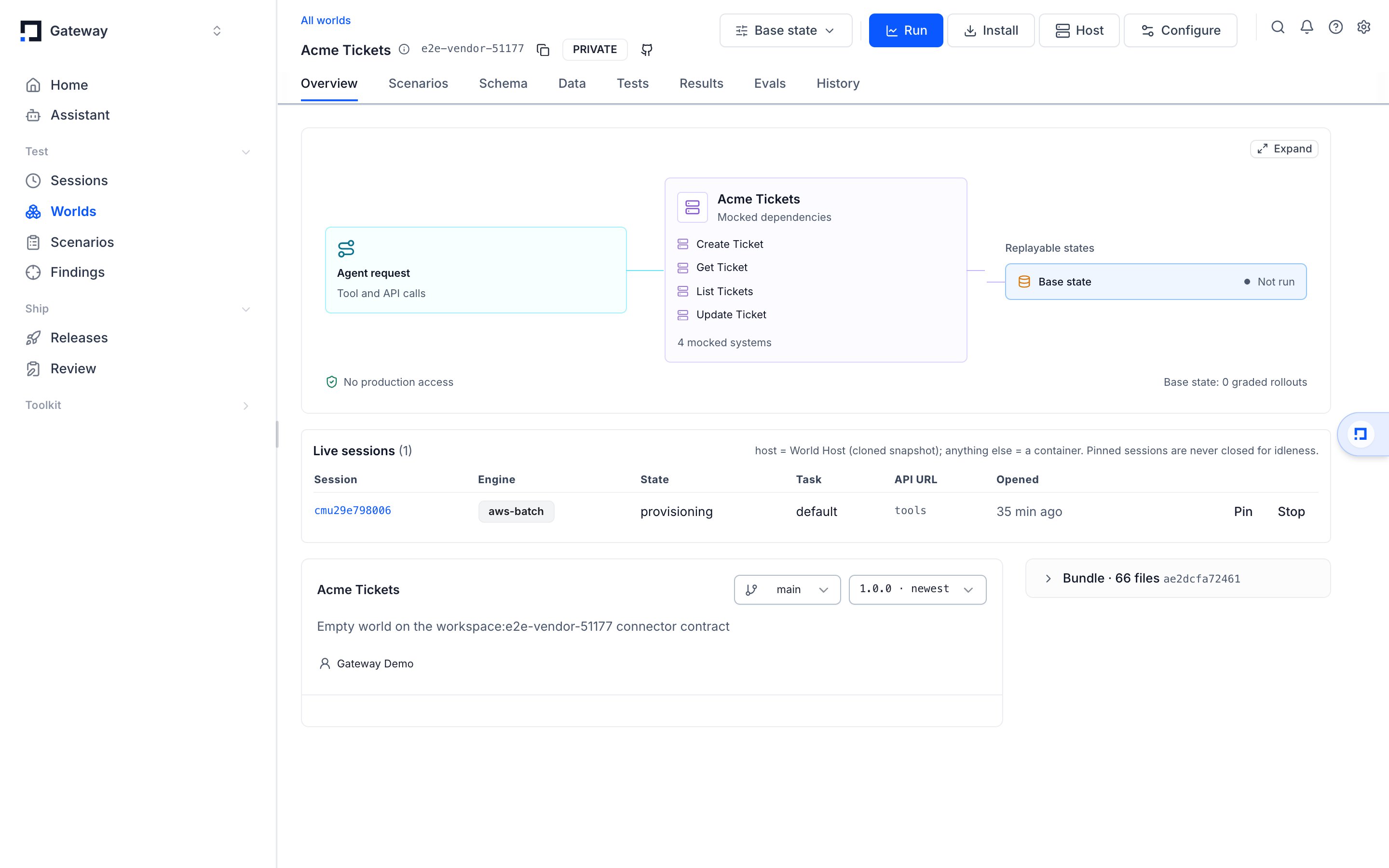
**Look at the world's Overview.** The Live sessions panel lists every session that is not
stopped or failed, with its engine, state, task, API URL and when it opened, plus Pin and
Stop buttons.
Close the sessions you open. A leaked session holds its container until the
idle reaper finds it, and a pinned leaked session holds it forever.
`--keep-warm` on close gives the container back to the warm pool so the next
session for the same task starts warm.
## Where to go next
* [Run many sessions at once](/worlds/parallel) for suites, concurrency and CI.
* [Simulations for your users](/worlds/for-your-users) to serve a world per customer.
* [Put data in a world](/worlds/data) for seeding a live session with rows.
* [Worlds client](/sdk/environments) to open and drive sessions from Python.
This documentation is built and hosted on [Mintlify](https://mintlify.com), a developer documentation platform.
## Open one and read what it prints
```bash theme={null}
export GATEWAY_HOST=https://withgateway.ai
export GATEWAY_PUBLIC_KEY=pk-lf-...
export GATEWAY_SECRET_KEY=sk-lf-...
gateway worlds session open vendor-world --task default --surface api
```
The output is the session descriptor:
```json theme={null}
{
"sessionId": "clx7f2...",
"surfaces": ["tools", "api"],
"api": {
"url": "https://w-clx7f2...-api.worlds.withgateway.ai",
"token": "…"
},
"task": { "source": "bundled", "name": "default" },
"ready": true,
"idleExpiresAt": "2026-01-01T12:30:00.000Z",
"pinned": false
}
```
Before the descriptor, `open` prints `session opening — gateway worlds session status ` on stderr, so a wait cut short keeps the id. The platform answers as soon as it accepts the session and the World Host opens it right after; `open` waits for `ready` up to `--timeout` seconds (600 by default). `idleExpiresAt` is when the idle reaper closes the session, and is `null` while it is pinned.
`sessionId` addresses the session in every other command. `api.url` is the world's own HTTP
API for that session alone — the host name carries the session id, so two sessions of the
same world never share an address.
## Surfaces: ask for what your agent actually uses
Every session serves `tools` over the platform's rendezvous. Ask for more with `--surface`
(short form `-s`), repeatable or comma-separated.
| Surface | What answers | Asked for with |
| - | - | - |
| `tools` | The world's tool calls; always served | nothing, it is on |
| `api` | The vendor's routes from `connector.toml`, at `api.url` — served with the tools from one World Host session | `--surface api` |
| `ui` | The world's page over its routes, where `connector.toml` declares `[ui]` — generated from the contract or hand-written ([Give a world a UI](/worlds/ui)) | `--surface ui` |
| `browser` | A hosted browser driving that page, leased from the browser pool | `--surface ui,browser` |
Ask only for surfaces the world declares. `browser` needs `ui`.
A World Host session's browser runs on one of two tiers. Pick one with `--browser-tier`; left
out, your organization's default applies (and `standard` when the organization has none).
| Tier | Capacity |
| - | - |
| `standard` | Spot capacity first, about half the price. It may be reclaimed with two minutes' notice, which ends the browser, never the world |
| `premium` | On-demand only; never spot-reclaimed |
```bash theme={null}
gateway worlds session open acme-world --task default --surface ui,browser --browser-tier premium
```
When a `standard` browser is reclaimed, the platform puts a new one behind the same `wsUrl` and
token. A browser from the SDK's `browser()` reconnects on its own within 90 seconds and reopens the
page the agent was on. A read (text, screenshot, title) or a `goto` that lost its browser is then
retried once. A click, type, press, back or scroll is not replayed, since it may already have
reached the world: the SDK raises `BrowserReconnected` so the agent looks at the page before acting
again. What lived only in the lost browser is gone: the open page's unsaved client-side state and
anything typed but not submitted.
If you drive your own Playwright, call `session.repairBrowser()` (TypeScript) or
`session.repair_browser()` (Python) after a dropped connection, then reconnect to the same `wsUrl`.
Opened with `--surface ui,browser`, the descriptor adds where the page and the browser answer:
```json theme={null}
{
"surfaces": ["tools", "api", "ui", "browser"],
"ui": { "url": "https://w-clx7f2....worlds.withgateway.ai/", "entry": "https://w-clx7f2....worlds.withgateway.ai/?token=…" },
"browser": { "wsUrl": "wss://w-clx7f2...-cdp.worlds.withgateway.ai/cdp/…", "viewport": { "width": 1280, "height": 800 }, "tier": "standard" }
}
```
`ui.entry` carries the session token once; the host trades it for a cookie on the first load.
`gateway worlds session browse ` opens that page in the browser surface and prints
what the agent would read.
## Send the token the way your client already sends credentials
A World Host session gates `api.url` on a per-session token, printed beside the URL. Send it
as a header on every request, never in the URL — a query token would outlive the request in
access logs.
```bash theme={null}
curl -sS -H "Authorization: Bearer $TOKEN" "$API_URL/v1/accounts"
```
Worlds whose vendor uses a `header` or `basic` scheme also accept the same token the vendor's
own way, so a client written against the real service works unchanged:
| The vendor's scheme | Also accepted |
| - | - |
| `header` | The vendor's header, e.g. `x-api-key: ` |
| `basic` | Basic auth with `` as the user |
| `oauth2` | The token as the password in a password grant |
Point an existing integration at a world by changing two values: the base URL
and the key. No code in your client has to know a world exists.
## Every session names the engine that serves it
`gateway worlds session status ` prints the engine serving it.
Every world opens on the World Host. The engine is not a choice you make on open: the host serves a world's tools and HTTP routes from one session.
| Engine | What it is |
| - | - |
| `host` | The World Host: a reflink clone of the version's snapshot in a shared process |
| `eks` | A pod, for a world whose `[ui]` is its own image or that ships its own server |
A benchmark package (harbor, verifiers) runs in a container, where the runner serves its tools. A schema world links other worlds into its session, and the host opens each linked world beside it.
## Drive the session
```bash theme={null}
gateway worlds session open vendor-world --task default --surface api
```
Use `--version-id ` to pin an exact version instead of the world's head. Every
[run](/glossary#run) then records the version it faced.
Call the world's tools, or its HTTP routes at `api.url`, or both. Both change the same state,
so a record written through the API is the record a tool call reads back. Tools and routes are
separate surfaces: a route answers over HTTP at `api.url`, and a call by a route's name answers
`400 {"error": "not_a_tool"}`, pointing at `api.url`. A tool may share a route's name; the call
runs the tool, and the route stays at its path. A task's `tools` lists the tools it may call, and
a task that lists any also closes the world's routes for that session (`403 route_not_allowed`).
A session answers its requests one at a time, and the sessions of one world version take turns.
Under a burst a request waits its turn, or answers `503 {"error": "busy"}` with a `Retry-After`
header: wait that many seconds and send it again. A tool call, a route, a grade, a seed, a reset, or
a read of the session's state or evidence that runs past 45 seconds answers
`504 {"error": "call_timeout"}` naming it; it may still finish, and until it does the session's next
requests answer `503 {"error": "call_running"}` with a `Retry-After`. If the process running the
world's own code restarts (it also does when a call has run for more than two minutes), the call in
flight answers `502 {"error": "worker_exited"}`; send it again, and the session, with any world it
opened beside it, carries on from every change already answered.
The session page links to its **Traced session** once anything is traced under the session's
id: the platform's trace of each episode's tool calls, and your agent's own traces when it
traces inside the session with the Gateway SDK (`with open_session(...) as s:` in Python,
`session.withTraceContext(fn)` in TypeScript). See
[Trace inside a world session](/tracing/sessions#trace-inside-a-world-session).
```bash theme={null}
gateway worlds session state # every entity's rows, right now, plus `calls`
gateway worlds session grade # {reward, rewards, raw} from the task's grader
```
The state carries one thing beside the rows: `calls`, every call the session answered — a
vendor-route request (operation, path args, query, body) or a tool called by name (its name and
arguments) — with `selectors` (every string the request carried, wherever it sat), `via` (the door
it came in by), status, the rows the answer carried and `found` (rows came back), because an
investigation that only reads leaves nothing else behind. `rows` counts what the route serves:
a list at its envelope or `results` path, or a `single` route's one row, bare or at that route's
own envelope. It is null where nothing declares the rows, a tool's object answer included. A field named as a credential (a password, token, secret, API key, PIN, card
number, CVC, e-signature), an item of a list so named (`passwords`), a `value` inside a field
so named (`password.value`), or a value shaped like one (a provider key, a bearer, a JWT, a
private key) is kept as `[redacted]`; every other field is kept as the agent sent it. A request
too large to keep (over 100,000 values or 1 MiB of text) names what it lacks in `withheld`: a
route call keeps its path and query and withholds its body, a tool call its arguments. A long
session's log keeps its newest calls, and its first `seq` says how many are gone. A session brought
back from its checkpoint numbers on from that checkpoint's calls, so the calls made after it are
not counted ([Bring a closed session back](#bring-a-closed-session-back)). A check grades
whenever the calls it can read decide it; where a withheld field, a null `found` or a call no
longer kept could change the result, it is ungraded, never guessed.
A grader reads it like an entity: `{ "entity": "calls", "where": { "operation":
"get_records_by_email", "found": true }, "assert": "any", "field": "selectors", "op":
"contains", "value": "alex@example.com" }` requires "the agent searched this and got rows",
whatever the vendor's request shape. `gateway worlds session export --requests` prints it whole,
a `gateway worlds serve` session's `GET /__session/state` carries it as the platform's does, and
`snapshot` and `calls` are reserved names an entity may not take.
`via` tells a click in the world's UI from a request the agent sent straight to the API. The
host sets it from where the request arrived, never from a header, so an agent cannot claim
another door:
| `via` | The request came in by |
| - | - |
| `ui` | the UI's same-origin `api_path` prefix (`/__world-api/…` on the session's UI origin) |
| `api` | the session's API origin (`api.url`) |
| `tool` | a tool called by name (`session.call(…)`) |
So "the agent opened the tab from the app, not the API" is one check:
`{ "entity": "calls", "where": { "operation": "open_workspace_tab", "via": "ui" }, "assert":
"exists" }`. `via` names the door, not who knocked: anything that holds the session's UI
cookie or token and calls the UI origin's prefix is `ui`. `gateway worlds serve` tags the same
way: only the UI port's prefix counts as `ui`; the same prefix on the session port is the API
origin, so it is `api`.
`via` checks read the call log of a world with HTTP routes (a `connector.toml`), on a World
Host session or under `gateway worlds serve`. When you create, update or validate a stored task,
each world its `via` checks read (in `where` or as `field`, on `calls` or a cross-world
verifier's `.calls`) must run on the World Host and have routes. Create and update
answer 400 naming the world; validate answers `ok: false` with it under `problems`. A check
that names `via` over a call log without it is ungraded (the grade says why), never a pass.
A grade may carry the agent's own report (`session.grade({ report })` in TypeScript,
`session.grade(report=...)` in Python, `report` in the body of `POST …/calls` with
`kind: "grade"`). A rubric judge reads it as the agent's claim beside the evidence — a
finding is credited only where the state or the calls bear it out, and a claim the evidence
contradicts counts against it. Assertions and python graders ignore it.
```bash theme={null}
gateway worlds session reset # back to the opening state; the call log stays
gateway worlds session close
gateway worlds session close --keep-warm # hand the container back to the pool
```
## The rest of the session commands
| Command | What it does |
| - | - |
| `gateway worlds session list` | The project's sessions in every state, from provisioning to stopped, newest first; the live ones are `--state RUNNING` and `--state IDLE` |
| `gateway worlds session status ` | State, engine, tools, surfaces, `idleExpiresAt` and `pinned` |
| `gateway worlds session state ` | Every entity's rows as the live world holds them |
| `gateway worlds session seed rows.json` | Put rows into the live copy only; see [Put data in a world](/worlds/data) |
| `gateway worlds session reset ` | Back to the version's snapshot plus the task's seed |
| `gateway worlds session grade ` | Run the task's grader over the end state |
| `gateway worlds session export ` | The call ledger as JSONL, oldest first; `--requests` appends the world's own request log |
| `gateway worlds session browse ` | Open the UI in the browser surface and print what the agent would read |
| `gateway worlds session pin ` | Exempt the session from the idle reaper |
| `gateway worlds session close ` | End it |
| `gateway worlds session reopen ` | Bring a closed session back, same id, from its last checkpoint |
`session export` writes the calls the platform brokered: `call`, `grade`, `seed`, `reset`, `state`
and `close`. A U+0000 character in a call's arguments or result is recorded, and handed to the
world, as U+FFFD (the replacement character). `--requests` also reads the world's own request log from the live session and appends
each entry as a line with `kind: "request"`. That log is the `calls` a grader reads, so it holds
the requests your agent made through the browser or straight to `api.url`, each with its `via`.
```bash theme={null}
gateway worlds session export --requests --out acme.calls.jsonl
# wrote 12 calls and 40 requests to acme.calls.jsonl
```
A request line carries `{seq, kind: "request", tool, args: {method, path, args, query, body, via},
result: {status, rows, found}, error: null, completedAt}`, where `tool` is the operation, or the
tool called by name (its `method` and `path` are null). Credential fields read `[redacted]` in
request lines; `call` lines keep a tool's arguments as your agent sent them.
`--requests` reads the running session with one `state` call, which the
ledger records like any other, so export before you close. A session that
cannot answer fails the command, and nothing is written.
## Tasks that need several worlds
Some tasks span worlds: an investigation reads a breach feed, a threat-intel API and a
ticketing system, and the agent needs all three up at once. A stored task declares every
world it needs in a `worlds` table, and one command brings them all up.
```json theme={null}
{
"name": "orion-infostealer",
"instruction": "Find the stolen credentials and lock the account.",
"metadata": { "case": "c_42" },
"worlds": {
"spycloud": {
"slug": "spycloud-world",
"seed": { "rows": { "breaches": [{ "id": "b1", "email": "a@x.io" }] } },
"grader": { "kind": "assertions", "checks": [{ "entity": "breaches", "where": { "id": "b1" } }] },
"tools": ["search_breaches"]
},
"torchlight": { "slug": "torchlight-world", "ref": "v2" },
"flashpoint": { "slug": "flashpoint-world" }
}
}
```
Each key is an **alias** — what the sessions come back under. Each entry names a world
(`slug`), optionally one of its branches or tags (`ref`, default `main`), and that world's
share of the task: its own `seed`, `grader` and `tools`, the same three fields a single-world
task carries. With `worlds` present the top-level `seed`, `grader` and `tools` are refused
(they have no world to apply to), and the task is not pinned to any one world. The
`instruction` and `metadata` are shared by every world.
```bash theme={null}
gateway worlds task create ./tasks/orion.json # every slug and ref is checked now
gateway worlds task validate # each alias against its world's contract
gateway worlds task up --surface api --out orion.manifest.json
gateway worlds task status orion.manifest.json
gateway worlds task grade orion.manifest.json # per-world rewards + the aggregate
gateway worlds task export orion.manifest.json --out orion.calls.jsonl
gateway worlds task down orion.manifest.json
```
`task up` opens one session per alias in **one platform call** and prints one manifest:
```json theme={null}
{
"taskId": "wt_…",
"taskVersion": 1,
"name": "orion-infostealer",
"instruction": "Find the stolen credentials and lock the account.",
"sessions": {
"spycloud": { "slug": "spycloud-world", "ref": "main", "private": false, "sessionId": "…", "ready": true, "surfaces": ["tools", "api"], "api": { "url": "…", "token": "…" } },
"torchlight": { "slug": "torchlight-world", "ref": "v2", "private": false, "sessionId": "…", "ready": true, "surfaces": ["tools", "api"], "api": { "url": "…", "token": "…" } },
"flashpoint": { "slug": "flashpoint-world", "ref": "main", "private": false, "sessionId": "…", "ready": true, "surfaces": ["tools", "api"], "api": { "url": "…", "token": "…" } }
}
}
```
Each entry is what `session open` prints for that world. `up` is all or nothing: if any
world refuses to open, the ones that did are closed and the error names every alias that
failed — nothing is ever half up. `up` also takes a spec file directly (`task up ./orion.json`)
for a task you have not stored.
Each `ref` resolves through your edit view: when you have an open edit session on a world
and it has written a version (see `gateway worlds edit status`), that world's `main` comes up
at your session's tip; everyone else still gets the shared `main` until you close the edit.
`task create` and `task validate` check the same versions, so what they accept is what `up`
opens.
`"private": true` means exactly one thing: your open edit session's tip stood in for `main`.
It is `false` for a tag or any other branch, and for an edit session that has not written
anything yet. Every manifest entry and every `validate` row carries it; `validate` on a task
pinned to one world carries it at the top level (`false` for `--version-id`), and a
multi-world answer's top level and an alias that did not resolve say `null`.
The later commands take either the manifest or the task id. With a task id, `status` and
`grade` find the stored task's live sessions (and refuse when an alias is up twice from two
`up`s — pass the manifest then); `down` closes every live session of the task.
`task grade` answers `{reward, rewards, worlds, ungraded, verifiers, errors}`: `worlds` holds
each alias's own grade, `rewards` flattens them as `` and `.`, `reward` is
the mean of the worlds that answered a number, and a world with no grader (or a rubric judge
still pending) is listed under `ungraded` rather than counted as 0. A grader that could not
grade is named under `errors`; the `reward` is then `null` and the command exits 1. `task export` writes every
world's call ledger as one JSONL file with a `world` field on each line; `--requests` adds each
world's own request log the same way (`wrote N calls and M requests from K worlds to `).
Under the hood this is `POST /api/public/world-task-sessions` with `{task: {id} | spec,
surfaces?, reuseWarm?, browserTier?}` (`browserTier` applies to every world), answering the manifest, and `GET /api/public/world-task-sessions?taskId=`
listing a task's live sessions. Open a multi-world task through `task up` or this endpoint.
### Edit several worlds together
Every change you push to a world (`bench push`, a sandbox commit, a data import) lands on your
**edit session** for that world: a private copy only your key sees, which becomes the world's shared
`main` when you close it, or after 60 minutes without an edit. When one change spans the worlds of
a task, close them together, so `main` never holds half of it:
```json theme={null}
{
"name": "support-reply",
"instruction": "Answer the customer in the help desk and post the summary in chat.",
"worlds": {
"desk": { "slug": "acme-desk" },
"chat": { "slug": "acme-chat" }
}
}
```
```bash theme={null}
gateway worlds task edit status support.json # per world: your unsealed edits, and what closing would do
gateway worlds task edit close support.json -m "reply templates in desk and chat"
gateway worlds task edit rollback support.json --group
```
* `status` lists, per alias, your open session (edit count, base, tip) and what closing now would do:
`fast-forward`, `rebase` (`main` moved on other files) or `conflict` with the paths, plus any of your
sessions `parked` in conflict there. `unsealed` names the worlds holding edits only you see: your
own `task up` opens them at your tip (`"private": true`), while colleagues, run configs and schedules
still get the shared `main` until you close them.
* `close` seals every world in **one step**: every `main` moves, or none does. If any world conflicts,
is not in your project, names a `ref` other than `main`, or holds a session of yours parked in
conflict, nothing is sealed and the error names every world's problem (exit 1); a parked session is
resolved with `gateway worlds edit close --session --force` or `edit discard`. A world
with no open edit is skipped and listed under `skipped`; `--require-all` refuses instead. `--force`
keeps your files where `main` changed the same paths.
* The answer is `{groupId, worlds: {alias: {slug, session}}, skipped}`. `rollback --group `
returns every world's source and data to the `main` the group replaced (a colleague's change that
landed before yours stays), again in one step, as new sessions you can roll back too. It is refused
when anything reached a world's `main` after the group — a later session or a write outside
sessions — unless `--force`. A world whose seal left `main` where it was (someone had already
sealed the same files) has nothing to undo and is listed under `skipped`; the other worlds still
roll back together.
* `` is a task id, a spec file, or the manifest `task up --out` wrote. Only your own open sessions
are sealed; close before a session idles out (60 minutes), or that world seals on its own.
Under the hood this is `POST /api/public/world-task-edits/status|close|rollback` with `{task: {id} |
spec, …}`; the MCP tools are `get_task_edit`, `close_task_edit` and `rollback_task_edit`. For one
world, `gateway worlds edit status|close|rollback ` does the same.
### Verifiers that span worlds
A world's `grader` only sees that world. A scenario question that spans worlds — *was the
company officer found in the registry the owner of the wallet seen on chain? did the agent
consult every source before concluding?* — lives on the task instead, as a **verifier**: the
same `assertions` or `python` grader, with a `scope` of aliases it reads.
```json theme={null}
{
"name": "offshore-shell-trace",
"instruction": "Identify who controls Acme Holdings and where its funds went.",
"worlds": {
"registry": { "slug": "opencorporates-world" },
"chain": { "slug": "chain-world" },
"leaks": { "slug": "spycloud-world" }
},
"verifiers": [
{
"name": "consulted_every_source",
"kind": "assertions",
"scope": ["registry", "chain", "leaks"],
"checks": [
{ "entity": "registry.calls", "assert": "count", "count": { "gte": 1 } },
{ "entity": "chain.calls", "assert": "count", "count": { "gte": 1 } },
{ "entity": "leaks.calls", "assert": "count", "count": { "gte": 1 } }
]
},
{
"name": "officer_is_wallet_owner",
"kind": "python",
"scope": ["chain", "registry"],
"source": "import json, sys\ns = json.load(sys.stdin)\nofficers = {r['name'] for r in s['registry.officers'].values()}\nowners = {r['owner_name'] for r in s['chain.wallets'].values()}\nprint(json.dumps({'reward': float(bool(officers & owners))}))\n"
}
]
}
```
A verifier reads one state in which every scoped world's rows are `.` and
its call log `.calls` — the naming a world's dependencies already use, so a check or
a `verify.py` written for one world reads the merged state the same way. The agent's
`report` sits at the top, as for any grader. A `scope` names two or more of the task's
aliases; a `rubric` cannot be a verifier (a judge reads one world), and a verifier cannot be
anchored on a world whose own grader is a rubric.
A `python` grader or verifier prints one flat JSON object as its last line: `reward` plus one
number per check, such as `{"reward": 0.5, "card_moved": 1, "assigned": 0}`. Each other key
becomes a check under the world's alias (`asana.card_moved`). A check is a number from 0 to 1,
`true` or `false` (1 or 0), or `null` for a check it could not grade; a string reads as ungraded
too. A nested object or array, such as checks nested under `rewards`, a number outside 0 to 1, or
`NaN` / `Infinity` fails the grade with an error that names the key (and the value, for a
number). Print diagnostics such as counts to stderr.
Verifiers run on the platform, never on your machine: each one runs on the World Host
session of the **first alias in its scope**, and the platform reads the other scoped worlds'
evidence from their own sessions when the grade is called — `task grade` and the SDKs name
the task's other sessions on every grade for you. `task grade` then answers:
```json theme={null}
{
"reward": 0.83,
"rewards": {
"registry": 1.0, "chain": 1.0,
"x.consulted_every_source": 0.667, "x.consulted_every_source.check_2": 0.0,
"x.officer_is_wallet_owner": 1.0
},
"worlds": { "registry": { … }, "chain": { …, "verifiers": { … } }, "leaks": { … } },
"verifiers": {
"consulted_every_source": { "reward": 0.667, "rewards": { "check_0": 1.0, "check_1": 1.0, "check_2": 0.0 } },
"officer_is_wallet_owner": { "reward": 1.0, "rewards": {} }
},
"ungraded": ["leaks"],
"errors": {}
}
```
A verifier's rewards flatten under `x.`, so no world may be aliased `x` or `x.<…>`:
creating or validating such a task is refused. The task's `reward` is the mean over the worlds
**and** the verifiers that answered a number. A verifier that could not grade (a scoped
world's session gone, a check naming an entity no scoped world holds, a `verify.py` that
failed) is named under `errors` as `x.`, with the reason also under
`verifiers..error`; the task's `reward` is then `null`, never the mean of the rest, and
`task run` files the run failed with that reason. No world's contract vets a cross-world
check's entity, so a misspelt one is an error rather than a silently passing `absent`.
Grading a session by hand (`session grade --world alias=sessionId …`, or `POST …/calls`
with `kind: "grade"` and `worlds: {alias: sessionId}`) names the other sessions the same
way. What the caller got wrong is refused with its name: a scoped alias left out, or a
session that belongs to another task than the alias's world.
## Keep a session up past the idle timeout
A session closes after 30 idle minutes unless it is pinned. Traffic counts as activity,
including plain HTTP to `api.url`, so a session in use stays up on its own.
Pin a session when its URL has to answer around the clock — a demo, a long-lived integration
test, a world someone else is pointing a client at. Four ways do the same thing:
```bash theme={null}
gateway worlds session pin # pin
gateway worlds session pin --off # unpin
```
```bash theme={null}
curl -sS -X PATCH "$GATEWAY_HOST/api/public/world-sessions/$SESSION_ID" \
-u "$GATEWAY_PUBLIC_KEY:$GATEWAY_SECRET_KEY" \
-H 'Content-Type: application/json' \
-d '{"pinned": true}'
```
The other two are in the app: **Pin** on the world Overview's Live sessions panel, and the
Host dialog. A pinned session runs until you close it; `close` is the only way out.
## Bring a closed session back
A session that closed — by you or by the idle reaper — can come back under the same id:
```bash theme={null}
gateway worlds session reopen
```
It restarts from the session's checkpoint, the platform's last export of it while it ran, and prints
what `status` prints. The platform takes that checkpoint about once a minute while the session runs.
Work done after that export is not in it. The checkpoint holds the world's request log as well as its
rows, so graders and `session export --requests` still see the requests made up to the checkpoint.
Requests made after it are gone with the rows they wrote, and the log numbers on from the
checkpoint's last request, so nothing marks them. A session recovered after its host was lost
resumes the same way.
The command exits `1` while the
session still runs (`session_not_closed`), when it was never checkpointed
(`session_no_checkpoint` — open a new session instead), while another reopen is under way
(`session_reopen_in_progress` — retry), or when the world version it ran on is no longer available
(`session_version_unavailable` — open a new session). Closing a session the platform is bringing
back after its host was lost answers `session_reopen_in_progress` too: retry once it runs.
A session closed within about a minute of opening has no checkpoint yet and answers
`session_no_checkpoint`.
## Verify
Three checks, cheapest first.
**Ask the platform.** `gateway worlds session status ` prints state, engine,
tools and surfaces. `ready` means a call will be answered, not that the job was accepted.
**Ask the world.** A request to `api.url` with the token returns the vendor's own response;
without the token it returns 401, and after the session closes it returns 404.
```bash theme={null}
curl -sS -o /dev/null -w '%{http_code}\n' \
-H "Authorization: Bearer $TOKEN" "$API_URL/v1/accounts"
```
**Look at the world's Overview.** The Live sessions panel lists every session that is not
stopped or failed, with its engine, state, task, API URL and when it opened, plus Pin and
Stop buttons.
Close the sessions you open. A leaked session holds its container until the
idle reaper finds it, and a pinned leaked session holds it forever.
`--keep-warm` on close gives the container back to the warm pool so the next
session for the same task starts warm.
## Where to go next
* [Run many sessions at once](/worlds/parallel) for suites, concurrency and CI.
* [Simulations for your users](/worlds/for-your-users) to serve a world per customer.
* [Put data in a world](/worlds/data) for seeding a live session with rows.
* [Worlds client](/sdk/environments) to open and drive sessions from Python.
This documentation is built and hosted on [Mintlify](https://mintlify.com), a developer documentation platform.