> ## Documentation Index
> Fetch the complete documentation index at: https://docs.surfacearea.ai/llms.txt
> Use this file to discover all available pages before exploring further.
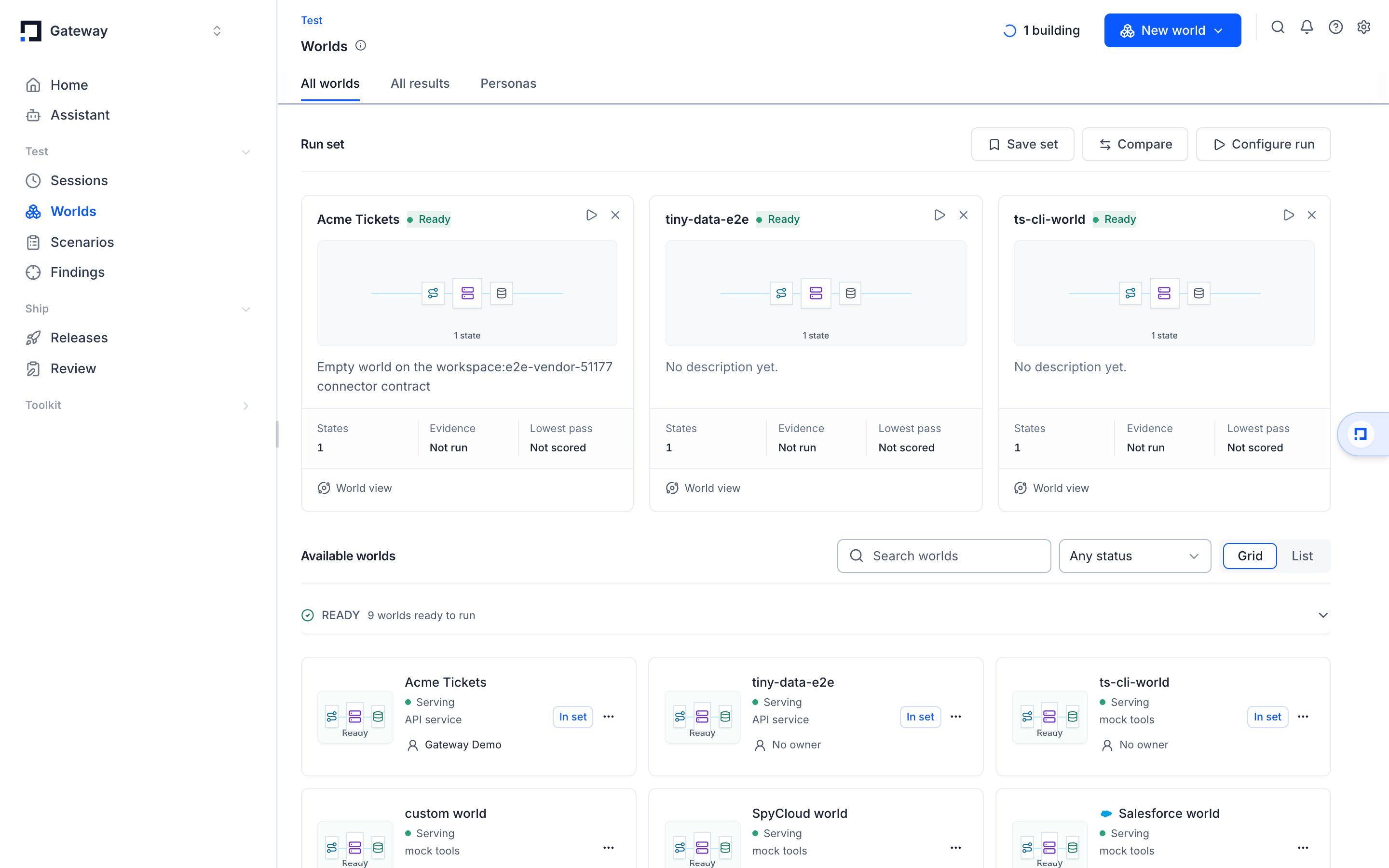
# Worlds
> A world is a sealed replica of the systems your agent works against, built from real sessions and pinned to a version, so a candidate can be run against it as often as you like.
A world is a sealed replica of the systems your agent works against — your ledger, your service desk, your identity provider — rebuilt as services the agent can call as often as it likes. Same shapes, same failure modes, same edge cases. Nothing inside a world reaches the outside, so a candidate agent can run against it ten thousand times without touching a customer, a transaction, or a live workflow.
Worlds live under **Worlds** in the project sidebar.
 ## Why a world, and not a test suite
A test suite checks the responses your agent produced. A world checks the decisions it makes when the system underneath it behaves the way the real one does.
Some behaviour cannot be written down as an input and an expected output:
* A refund is denied because the ledger says the charge already settled.
* A sanctions screen half-matches a name at 0.91.
* An upstream service starts timing out on the third call.
If you can write the expected answer down in advance, you want an eval. If the
answer depends on what the systems around the agent do, you want a world.
## One world per system, not one per test
A world models **a system your agent has to deal with**, not a single case. Build one world for checkout, one for support triage, one for refunds, then ask each of them many questions.
One world holds many [scenarios](/glossary#scenario), many [rollouts](/glossary#rollout), and many runs over time. Make a new world only when the agent starts working against a genuinely different system. If two situations call the same services and read the same data, they belong in the same world.
## Sealed, and pinned to a moment
A world starts from captured sessions, selected connector data, or an explicitly labeled synthetic workspace. Two properties keep the starting state useful across repeated runs.
**Sealed** means world tools change only the world's stored state. Captured or synthetic records belong to the replica, and tool writes do not change the connected customer system.
**Pinned** means every world has a version, and every [run](/glossary#run) records the version it ran against. Without the version a pass rate is uninterpretable: you would not know whether the number moved because the agent changed or because the world did.
Pinning is what makes two runs comparable. When a run is recorded as `0.8.0 ·
939cd2df`, the second half is the exact world state it faced. Two runs against
the same pinned state, with the model held fixed, differ by exactly the thing
you changed.
Pinning does not freeze a world forever. Advance a world to a new version deliberately. The old version stays addressable, so old runs keep meaning what they meant.
## One session becomes many questions
For a populated collaboration example, [build a Slack world from Connectors](/worlds/slack). Choose a deterministic synthetic workspace or capture selected public/private conversations, then run an agent against the published version and grade its replies and reactions.
Captured sessions are the seed. Replay only tests the path that already happened. A world also generates the situations that did not:
| Generated from one seed | What it tests |
| - | - |
| Baseline | The path that actually occurred |
| Fork at the failing turn | Everything downstream of the moment it went wrong |
| Evidence withheld | Behaviour when a needed fact is simply missing |
| Evidence poisoned | Behaviour when a fact is present and wrong |
| Graph perturbed | A changed relationship between entities |
| Tool faults | Timeouts, malformed responses, intermittent failures |
| Alternate paths | A different but valid way through the same task |
| Long horizon | Whether it still holds together far from the start |
## Failures, in both directions
**Reactively.** Promote a production failure into a scenario. Every candidate from then on has to get it right before it can ship.
**Proactively.** Apply the shapes in the table above to a workflow that has never failed, and find where it breaks before a customer does.
## Comparing models against your own systems
Because the world is pinned, everything except the model can be held fixed. Hold the agent, tools, policy, and cases constant, change only the model, and read the runs against each other. The answer is specific to your systems.
## Where to go next
[Getting started](/worlds/getting-started) builds one world end to end: contract, data, version, session, graded run.
**Run a world.** Driving a world that already exists.
| Page | What it covers |
| - | - |
| [Spin worlds up and down](/worlds/sessions) | Opening, pinning, seeding, and closing live sessions |
| [Run many sessions at once](/worlds/parallel) | Running a whole scenario set in parallel |
| [Simulations for your users](/worlds/for-your-users) | Handing a world to the people who use your product |
| [Test a world](/worlds/tests) | The tests a world ships for itself, run locally and on every push |
| [Run API worlds in CI](/worlds/ci) | Gating a pull request on a world's score |
**Author a world.** Building one and keeping it honest.
| Page | What it covers |
| - | - |
| [Put data in a world](/worlds/data) | Rows from a file, a live session, or a real run |
| [Keep real data out](/worlds/redaction) | The `[redact]` policy, and redacting rows on the way in |
| [Mock any vendor API](/worlds/custom-connections) | `connector.toml`, capture, handlers, and conformance |
| [The files a world is made of](/worlds/contract) | A key reference for `schema/world.json`, `gateway-env.toml` and `connector.toml` |
| [Build a Slack world](/worlds/slack) | A populated example, start to finish |
| [What makes a world good](/worlds/good-world) | The bar a world has to clear to be worth running |
| [Author worlds from chat](/worlds/assistant) | Letting the Assistant do the authoring |
| [The sample repository](/worlds/sample-repo) | A working world you can read and copy |
**Elsewhere on the site.**
* [Glossary](/glossary) for the six words the whole product is built from.
* [Tracing](/tracing) to capture the sessions a world is seeded with.
* [Evaluation & Replay](/evaluation) for how a world's runs are scored.
* [Worlds client](/sdk/environments) to inspect worlds, scenarios, and rollouts from Python.
This documentation is built and hosted on [Mintlify](https://mintlify.com), a developer documentation platform.
## Why a world, and not a test suite
A test suite checks the responses your agent produced. A world checks the decisions it makes when the system underneath it behaves the way the real one does.
Some behaviour cannot be written down as an input and an expected output:
* A refund is denied because the ledger says the charge already settled.
* A sanctions screen half-matches a name at 0.91.
* An upstream service starts timing out on the third call.
If you can write the expected answer down in advance, you want an eval. If the
answer depends on what the systems around the agent do, you want a world.
## One world per system, not one per test
A world models **a system your agent has to deal with**, not a single case. Build one world for checkout, one for support triage, one for refunds, then ask each of them many questions.
One world holds many [scenarios](/glossary#scenario), many [rollouts](/glossary#rollout), and many runs over time. Make a new world only when the agent starts working against a genuinely different system. If two situations call the same services and read the same data, they belong in the same world.
## Sealed, and pinned to a moment
A world starts from captured sessions, selected connector data, or an explicitly labeled synthetic workspace. Two properties keep the starting state useful across repeated runs.
**Sealed** means world tools change only the world's stored state. Captured or synthetic records belong to the replica, and tool writes do not change the connected customer system.
**Pinned** means every world has a version, and every [run](/glossary#run) records the version it ran against. Without the version a pass rate is uninterpretable: you would not know whether the number moved because the agent changed or because the world did.
Pinning is what makes two runs comparable. When a run is recorded as `0.8.0 ·
939cd2df`, the second half is the exact world state it faced. Two runs against
the same pinned state, with the model held fixed, differ by exactly the thing
you changed.
Pinning does not freeze a world forever. Advance a world to a new version deliberately. The old version stays addressable, so old runs keep meaning what they meant.
## One session becomes many questions
For a populated collaboration example, [build a Slack world from Connectors](/worlds/slack). Choose a deterministic synthetic workspace or capture selected public/private conversations, then run an agent against the published version and grade its replies and reactions.
Captured sessions are the seed. Replay only tests the path that already happened. A world also generates the situations that did not:
| Generated from one seed | What it tests |
| - | - |
| Baseline | The path that actually occurred |
| Fork at the failing turn | Everything downstream of the moment it went wrong |
| Evidence withheld | Behaviour when a needed fact is simply missing |
| Evidence poisoned | Behaviour when a fact is present and wrong |
| Graph perturbed | A changed relationship between entities |
| Tool faults | Timeouts, malformed responses, intermittent failures |
| Alternate paths | A different but valid way through the same task |
| Long horizon | Whether it still holds together far from the start |
## Failures, in both directions
**Reactively.** Promote a production failure into a scenario. Every candidate from then on has to get it right before it can ship.
**Proactively.** Apply the shapes in the table above to a workflow that has never failed, and find where it breaks before a customer does.
## Comparing models against your own systems
Because the world is pinned, everything except the model can be held fixed. Hold the agent, tools, policy, and cases constant, change only the model, and read the runs against each other. The answer is specific to your systems.
## Where to go next
[Getting started](/worlds/getting-started) builds one world end to end: contract, data, version, session, graded run.
**Run a world.** Driving a world that already exists.
| Page | What it covers |
| - | - |
| [Spin worlds up and down](/worlds/sessions) | Opening, pinning, seeding, and closing live sessions |
| [Run many sessions at once](/worlds/parallel) | Running a whole scenario set in parallel |
| [Simulations for your users](/worlds/for-your-users) | Handing a world to the people who use your product |
| [Test a world](/worlds/tests) | The tests a world ships for itself, run locally and on every push |
| [Run API worlds in CI](/worlds/ci) | Gating a pull request on a world's score |
**Author a world.** Building one and keeping it honest.
| Page | What it covers |
| - | - |
| [Put data in a world](/worlds/data) | Rows from a file, a live session, or a real run |
| [Keep real data out](/worlds/redaction) | The `[redact]` policy, and redacting rows on the way in |
| [Mock any vendor API](/worlds/custom-connections) | `connector.toml`, capture, handlers, and conformance |
| [The files a world is made of](/worlds/contract) | A key reference for `schema/world.json`, `gateway-env.toml` and `connector.toml` |
| [Build a Slack world](/worlds/slack) | A populated example, start to finish |
| [What makes a world good](/worlds/good-world) | The bar a world has to clear to be worth running |
| [Author worlds from chat](/worlds/assistant) | Letting the Assistant do the authoring |
| [The sample repository](/worlds/sample-repo) | A working world you can read and copy |
**Elsewhere on the site.**
* [Glossary](/glossary) for the six words the whole product is built from.
* [Tracing](/tracing) to capture the sessions a world is seeded with.
* [Evaluation & Replay](/evaluation) for how a world's runs are scored.
* [Worlds client](/sdk/environments) to inspect worlds, scenarios, and rollouts from Python.
This documentation is built and hosted on [Mintlify](https://mintlify.com), a developer documentation platform.